
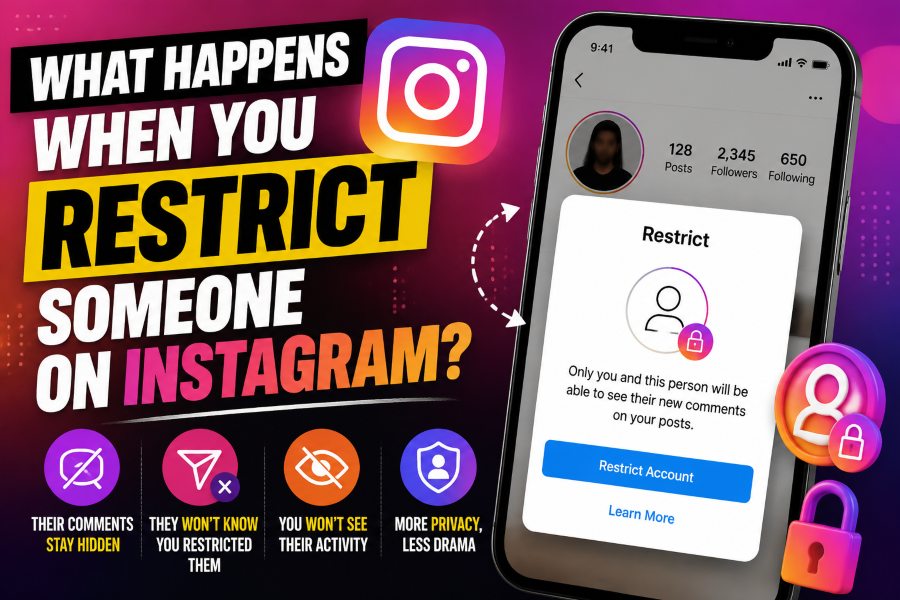
When you restrict someone on Instagram, their future comments on your posts are usually visible to that person but hidden from everyone else unless you choose to approve them. Their messages are moved away from your main inbox into message requests, and they cannot see when you are active or whether you have read their messages. Instagram does not send them a notification that you restricted them.
Restriction is designed as a quiet boundary. The person can generally still find your profile and view content they are otherwise allowed to see, so it is less final than blocking. It is useful when you want more control without creating an obvious confrontation.
What Does Restrict Mean on Instagram?
Restrict is an account-level interaction control that reduces how another person reaches you. It does not automatically delete them, remove every trace of their account, or make your profile invisible. Instead, it adds a layer of review around comments and messages while hiding certain activity signals.
Instagram introduced the feature as a lower-friction option for dealing with bullying, persistent comments, and uncomfortable interactions. A block can be easy to notice because the blocked person may no longer find or access the account in the same way. A restriction is intentionally subtle.
What Happens to Their Comments?
After an account is restricted, a new comment from that account on your post is generally not shown publicly by default. The restricted person may see the comment as if it were posted normally, while you can decide whether to view, approve, or delete it. Until you approve it, other users do not see it in the normal comment section.
You also avoid the pressure of an immediate public reply. You can leave the comment hidden, remove it, or make it visible when it is harmless. This is one reason restriction works well for repeated criticism, passive-aggressive comments, or someone who tries to provoke public arguments.
Restriction is not the same as turning off comments for everyone. It targets the interaction of a specific account while allowing the rest of your audience to continue commenting under your normal settings.
What Happens to Direct Messages?
Messages from a restricted account are moved to message requests rather than staying in the primary conversation area. You can open the request when you choose, and the restricted person does not receive the normal read receipt that tells them you saw the message.
You may also stop receiving the usual message notifications from that person. This gives you space to review communication without the constant interruption of alerts. The existing conversation is not necessarily erased, and the person can still send messages unless you block them or change broader message controls.
If a message contains threats, impersonation, blackmail, or repeated harassment, save evidence before deleting or blocking. Restriction reduces visibility, but serious abuse may require reporting and stronger safety steps.
Can They See When You Are Online?
A restricted person cannot normally see your activity status or whether you have read their direct messages. That means they should not see the green active indicator or a read receipt connected to their restricted conversation.
This does not make your entire Instagram activity private. They may still see public posts, likes, comments on other accounts, or content available through mutual connections, depending on each account’s privacy settings and Instagram’s interface. Restrict specifically limits direct interaction signals between you and that account.
Will Instagram Tell Them They Were Restricted?
Instagram does not send a notification saying that you restricted an account. The experience is designed to be discreet. The person may suspect something if their comments never receive responses, if mutual friends cannot see a comment they believe is public, or if message behavior changes, but there is no official restriction alert.
Because the feature is subtle, it can be helpful in situations where blocking might provoke more unwanted contact. However, do not rely on secrecy as a guarantee. A determined person may compare what they see from another account.
Can a Restricted Person Still See Your Posts and Stories?
Usually, yes, if they were already allowed to see them. Restrict does not automatically hide your feed posts, Reels, profile, or Stories. A public account remains broadly visible. On a private account, an approved follower may continue to see follower-only content unless you remove the follower, hide a Story from them, or block them.
This is one of the most important differences between restricting and blocking. Restriction manages interaction; blocking more aggressively limits access. To hide Stories from a particular person without blocking, use the Story privacy controls. To remove a private-account follower, open the follower list and choose Remove.
Can They Still Like, Tag, or Mention You?
Restriction does not automatically eliminate every form of engagement. A restricted account may still be able to like visible content or attempt to tag and mention you, subject to your separate privacy settings. Instagram provides additional controls for who can mention or tag you, so review those settings if the problem extends beyond comments and messages.
You can also use Limits to temporarily reduce unwanted interactions from groups such as recent followers or people who do not follow you. Restrict, Limits, hidden words, comment filters, and blocking solve different problems and can be combined when necessary.
How to Restrict Someone on Instagram
Open the person’s profile, tap the three-dot menu, and choose Restrict. Instagram may show a brief explanation before confirming. You can also restrict someone from a comment by pressing or swiping on the comment and selecting the relevant control, although the exact icons can differ between iPhone and Android versions.
Another route is Settings and activity, followed by the section that manages restricted accounts. Search for the username and add the account to your restricted list. Instagram changes menu labels from time to time, so use the settings search bar if you cannot immediately find the option.
How to Unrestrict Someone
Return to the person’s profile, open the menu, and choose Unrestrict. You can also review restricted accounts from Instagram settings and remove the account from the list.
Unrestricting restores normal interaction behavior going forward. It does not automatically approve old hidden comments or guarantee that previously filtered messages will return to the exact inbox position they had before. Review the conversation and comments manually if you want to keep or remove earlier content.
Restrict vs Block vs Mute
Restrict controls the other person’s comments, messages, activity-status access, and read receipts without clearly notifying them. Block is stronger: it prevents the account from interacting with or accessing you in the normal way and can also address other accounts they may create, depending on the block options Instagram presents.
Mute works in the opposite direction. It hides another person’s posts, Stories, or notes from your own experience without limiting how they interact with you. Removing a follower stops that account from following a private profile, but it does not necessarily prevent future requests or messages.
Choose the tool based on the problem. Use mute when you simply do not want to see someone’s content. Use restrict when you want to quietly filter their contact. Use block when you want a clear access barrier.
Does Restrict Affect Existing Comments and Likes?
The main restriction behavior applies to interaction while the account is restricted. Existing comments and likes may remain visible unless you delete the comments, remove the content, or use other moderation options. Review older posts if the person has left material you no longer want displayed.
Do not assume restriction cleans the history of the relationship. It is a control for present and future interaction, not a full content-removal tool.
When Restrict Is the Right Choice
Restrict is useful for a coworker, relative, classmate, customer, former friend, or acquaintance whose behavior is uncomfortable but not yet severe enough for a visible block. It can reduce public drama because their comments no longer control the conversation and their messages no longer demand immediate attention.
It is also helpful when you need time to evaluate a situation. You can restrict first, document behavior, and later decide whether to unrestrict, remove, report, or block the person.
For related privacy questions across platforms, see Buzzetra’s guide on how to see who is stalking your Facebook profile, which explains why visible engagement is not the same as a secret profile-view history.
When You Should Block or Report Instead
Use stronger action when there are threats, repeated unwanted contact, impersonation, sexual harassment, hate speech, attempts to obtain private information, or evasion through new accounts. Restriction can make messages quieter, but it does not guarantee safety or prevent the person from viewing public information.
Take screenshots and save usernames, dates, links, and message context. Report content or accounts that violate Instagram’s rules. If you believe you are in immediate danger, contact local authorities or a trusted safety organization.
What Restrict Does Not Do
Restrict does not make your account invisible to the other person. It does not automatically remove them from your followers, stop them from following you, hide your Stories, erase old likes, or delete previous comments. It also does not prevent someone from viewing public content while signed out or through another account when the content is publicly accessible.
The feature does not guarantee that the person will never discover the restriction. They may compare the comment section from another account, notice missing read receipts, or infer the change from your behavior. Use it because the controls are useful, not because secrecy is certain.
Restrict also does not replace evidence collection or formal reporting. If an account is threatening you, distributing private material, impersonating you, or repeatedly creating new accounts, document the activity and use the reporting and blocking tools. Consider making the account private, removing unknown followers, changing mention and tag permissions, and asking a trusted person to help review the situation.
Finally, restriction is not a punishment system. It is a personal moderation choice. You do not need to announce it, debate it, or justify it to the restricted person. Your objective is to make your Instagram experience safer and less disruptive.
Review the Boundary After Restricting
After a few days, review whether restriction solved the actual problem. Check message requests, hidden comments, tags, mentions, follower status, and Story visibility. If you still feel watched or pressured, make the account private, remove the follower, hide Stories, block the account, or report it. The best setting is the one that reduces contact enough for you to use Instagram without repeatedly monitoring the other person’s behavior.
Related Buzzetra Guides
- How to See Who Is Stalking Your Facebook Profile
- How to Pin a Comment on TikTok
- What Is LinkedIn Sales Navigator?
- Is Pinterest a Search Engine?
Frequently Asked Questions
Can someone tell if I restrict them on Instagram?
Instagram does not send a restriction notification. The person may notice indirect changes, but the app does not explicitly announce the action.
Do restricted accounts see my Stories?
They can generally see Stories they are otherwise allowed to view. Use Hide story from or block the account if you want to prevent Story access.
Can restricted people message me?
Yes, but their messages are routed to message requests, and they normally cannot see whether you read them.
Can a restricted person see my comments on other posts?
Restriction does not make your activity across Instagram invisible. They may still see interactions that are public or available to them through other accounts and posts.
Is restricting the same as unfollowing?
No. Restrict changes interaction controls. It does not automatically unfollow the person, remove them as a follower, or hide all content in either direction.
Final Takeaway
What happens when you restrict someone on Instagram is intentionally limited and discreet: their comments require your approval to become public, messages move to requests, and they lose access to your read receipts and activity status. They may still see content they are otherwise allowed to view. Use restriction for a quiet boundary, and move to removing, blocking, reporting, or safety support when the situation requires stronger protection.